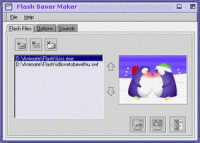
Flash Saver Maker allows you to make your own screensavers from your favorite Flash movies. Support *.swf and *.exe flash movies. Even support multiple flashs.Add your own mp3,wav or midi as background sound. No programming skills needed, easy to use
Fully functional shareware. Runs on Windows 95/98/Me/NT4/2000.
Flash Saver Maker allows you to make your own screensavers from your favorite Macromedia Flash movies. You can make your own screensavers direct from your Flash .SWF files, or even from your Flash executables. It is even possible to select multiple Flash files in one time, Flash Saver Maker plays them one by one, and then loops movies! If you like , you can turn all sound coming from the projector file off, and add mp3,midi or wav sound files as your own background sounds.
No programming skills needed: just add flash files to your screen saver with a point-and-click. Flash Saver Maker consists of a great interface, very nice to view and easy to use. It only takes you about 1 minute to have your own screen saver.
Full support for password in both Win95/98 and WinNT/2000.
Features include:
- Support Macromedia Flash 4, Flash 5, Flash 6, Flash MX (MX 2004)
- Support Flash exe and .SWF files
- Support multiple Flash files from local directories
- Display Flash files in normalize or random order
- Flash files can be previewed as thumbnails
- Allow you to turn all sound coming from the projector file on/off, and play Mp3, midi or Wave sound files as background sounds
- Select the way of screen saver exiting on mouse move, mouse click or key press
- Password protection is supported
- Online registration available
- And so on... Whats new in version 1.68: Major new release Requirements: 32MB RAM Operating system: Win95,Win98,WinME,WinNT 4.x,Windows2000 Release notes: New Release
While your computer is idle, five full size pictures appearing on your screen will give you the opportunity to take a look at these beautiful girls' abstract photos. Don't miss the chance to make your fantasies come true.
Price: $7.50, Rating: 10, Downloads: 236 Download
Do you like Christmas? Too bad it comes only once a year. Hey, if you really, really like Christmas - why not have it every day? Christmas 3D Screensaver brings the warm feelings of joy right to your computer desktop.
Price: $12.95, Rating: 10, Downloads: 200 Download
Love-tenderness of Sathya Sai Baba -- in His face, in the beauty of nature, in every manifestation of life. Enjoy, meditate, receive bliss.
Price: $0, Rating: 7.67, Downloads: 186 Download
Enjoy the variety of dog species. While your computer is idle, five full size pictures appearing on your screen will show you how sweet they are especially when they are still puppies. Don't miss the chance to experience that.
Price: $7.50, Rating: 5, Downloads: 170 Download
A map of recently discovered lands lies on the table with a magnifying glass nearby. Most likely, the owner of the room is planning his new trip to the newly discovered lands to describe the people who live there.
Price: $12.95, Rating: 5, Downloads: 165 Download
User Rating
Rating:2.2 out of
5 Based on13 ratings.
13 user reviews.

 Flash Saver Maker 1.68 details